RECEON

For businesses that sell on credit

Swap the paper tab book for your phone.

For corner stores, bakeries, butcher shops, clothing stores, bars and building supply stores.

Know who owes you, how much and since when. Note each purchase in seconds, send reminders on WhatsApp and RECEON tells you when it’s due.

Start for free on the Free plan. No credit card.

Corner store owner in an apron, arms crossed, at the counter
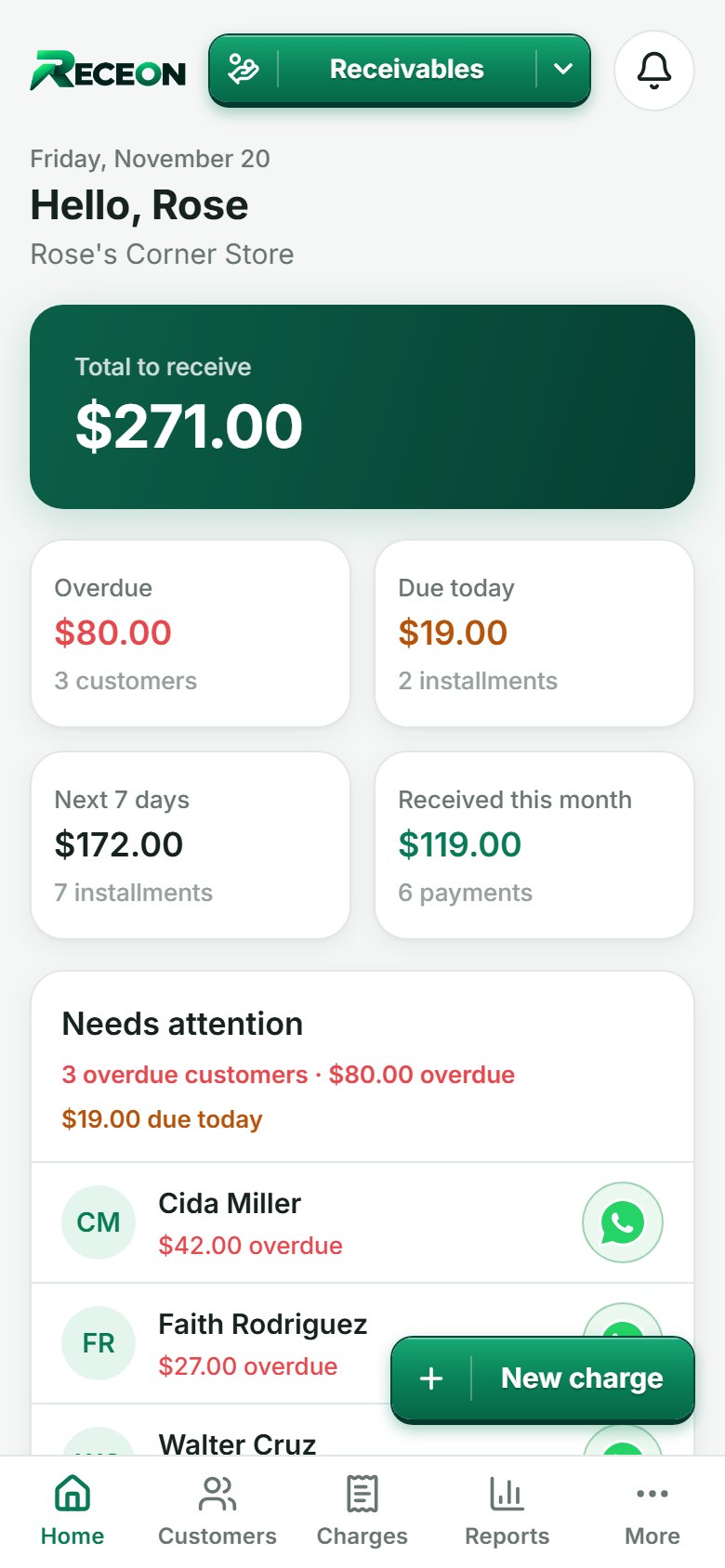
RECEON home screen for a corner store: total to receive, overdue tabs, due today and next 7 days

For businesses that sell on credit

From the corner store to the supply store, the tab works the same.

Shop owner taking notes at a corner store counter
Corner store and bakery Bread, milk and gas noted under each customer’s name.
Saleswoman handing bags to a customer in a clothing store
Clothing store Sold on store credit in 3 installments? Each one tracked.
Butcher in white serving behind the refrigerated counter
Butcher shop Weekend meat to be paid on payday.
Employee checking orders on a tablet inside a building supply store
Building supplies Building materials to be paid in 30 days.

And also bars, snack bars, neighborhood pharmacies, salons and any business that sells now and gets paid later.

The paper tab book never adds up.

It helped for a long time. But as business grows, the notebook starts to fail:

  • Torn page
  • Handwriting nobody can read
  • Totals that don’t match
  • Wet or lost notebook
  • “I already paid!”
  • Who paid half?
  • Owes for three months

And when a customer swears they already paid, there’s no way to prove it. At the end of the month, the notebook is full and the register is empty.

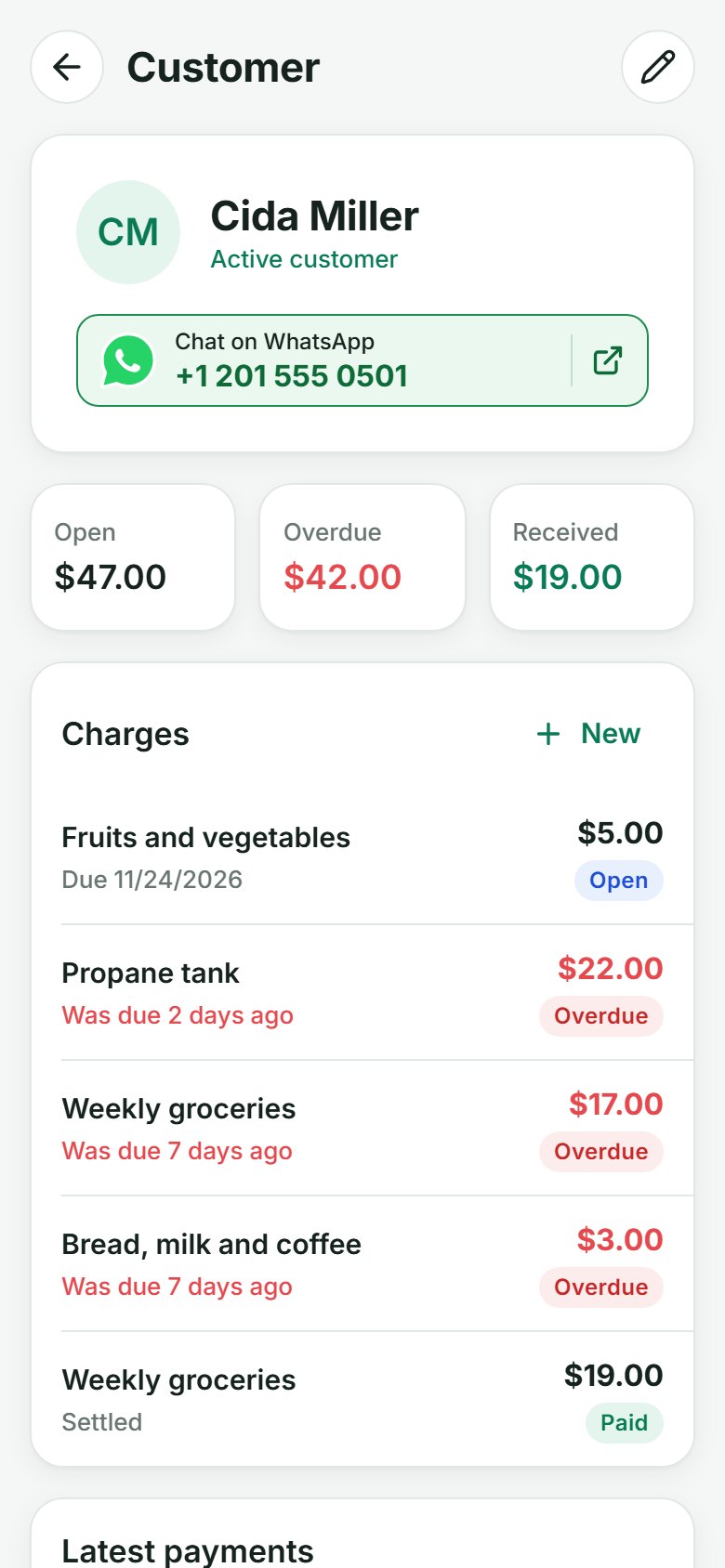
Customer page for Cida Miller in RECEON: $47.00 open, $42.00 overdue and each purchase with its due date

From notebook to RECEON

Mrs. Cida’s same tab, no math needed.

Each customer has their own page, like a page in the notebook, except it adds up on its own and keeps everything.

  • Each purchase with date, amount and the agreed payment day
  • What each customer owes, instantly, without doing the math
  • What was paid is recorded, with date and receipt
  • Late customers show up first on the home screen

Due date alerts

The notebook doesn’t remind you. RECEON does.

Notebooks, notepads and phone notes only keep what you wrote. They don’t remind you of anything. RECEON reminds you of tabs coming due, those already overdue and the bills you have to pay.

Notebook and notepad

  • Doesn’t tell you a tab is overdue
  • Doesn’t show what’s due this week
  • Doesn’t remind you of the distributor’s invoice
  • Only works if you remember to open it

RECEON

  • Shows who is late and for how many days
  • Shows what’s due today and in the next 7 days
  • Reminds you of your own bills too
  • Sends a summary to your phone every day, at the time you choose
RECEON · 08:00 Receivables You have 5 overdue charges, 2 due today and 1 due in the next 3 days.
RECEON · 08:00 Payables You have 1 bill due today and 2 due in the next 3 days.
  1. 5 days overdueLate, in red
  2. Due yesterdayAnd not paid
  3. Due todayTime to collect
  4. Next 7 daysWhat’s coming up

Phone alerts are in the Android app. In the browser and on iPhone, they stay in the RECEON bell.

How it works

From the counter to RECEON, in four steps.

  1. Add the customer with name and WhatsApp.
  2. Note each purchase on their page, with the amount and the payment day, like payday.
  3. On the day, open the home screen and see who owes and who is late.
  4. Remind on WhatsApp, record what you received and send the receipt.
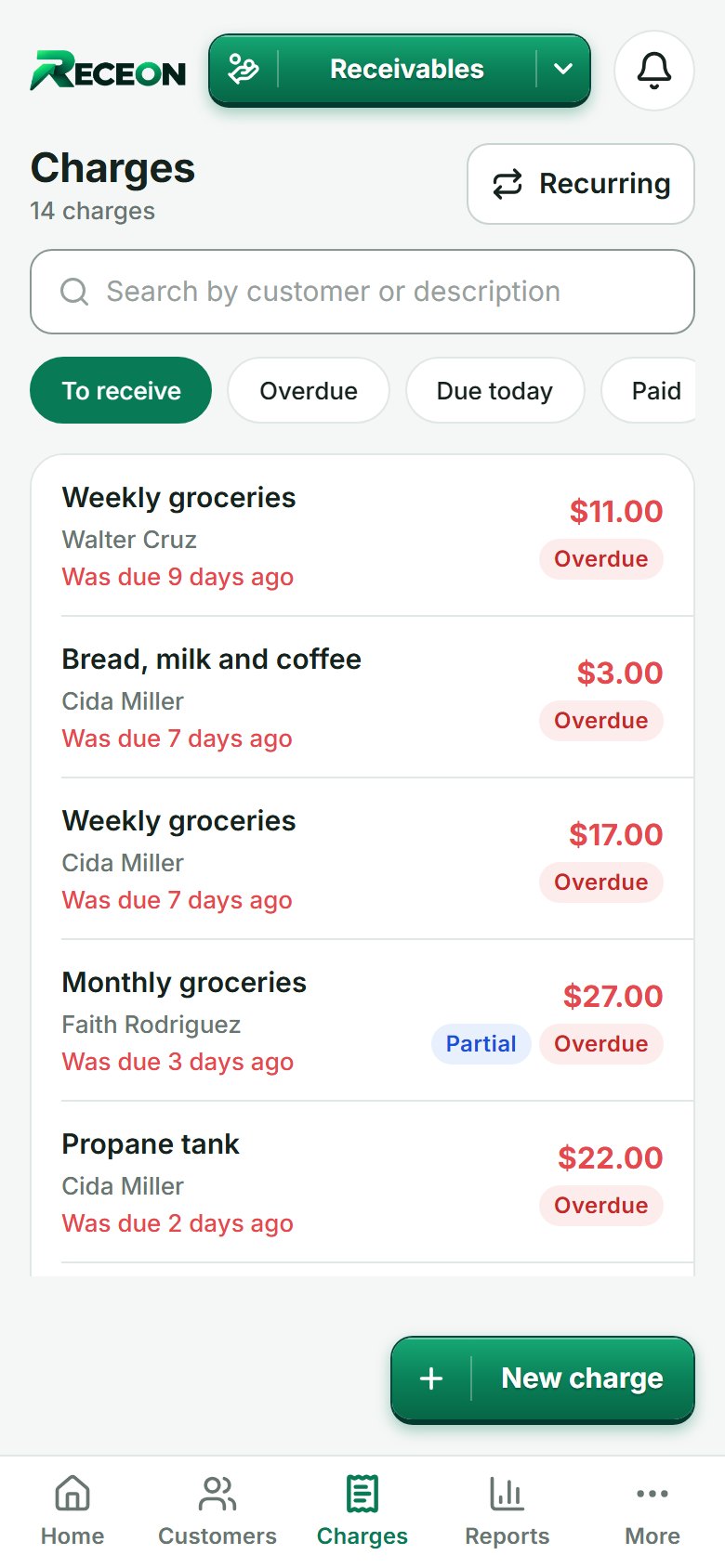
Tabs list in RECEON: overdue purchases, partly paid and due today

Everyday situations

Everything that happens with tabs has a place in RECEON.

Pays on payday

Each purchase is due on the agreed day, like the 15th. On that day, it shows on the home screen.

Due this week

The home screen shows the next 7 days, and each purchase shows “Due tomorrow” or the date.

Paid only part

Record the partial payment. The rest stays under their name until it is paid.

Store credit in 3 installments

Installment charge, with each installment tracked to the last one.

“I already paid!”

The history shows each payment, with the date and the receipt.

Customer who has owed for months

RECEON shows how many days each purchase has been overdue.

WhatsApp reminders

Collect without awkwardness and without exposing anyone.

No more lists on the wall or asking in front of others. RECEON writes a polite message with the overdue amount under the customer’s name.

  • You review the text and send it from your WhatsApp, privately.
  • You can remind them before the due date, not only after it’s late.
  • Got paid? Record the payment and send the PDF receipt.
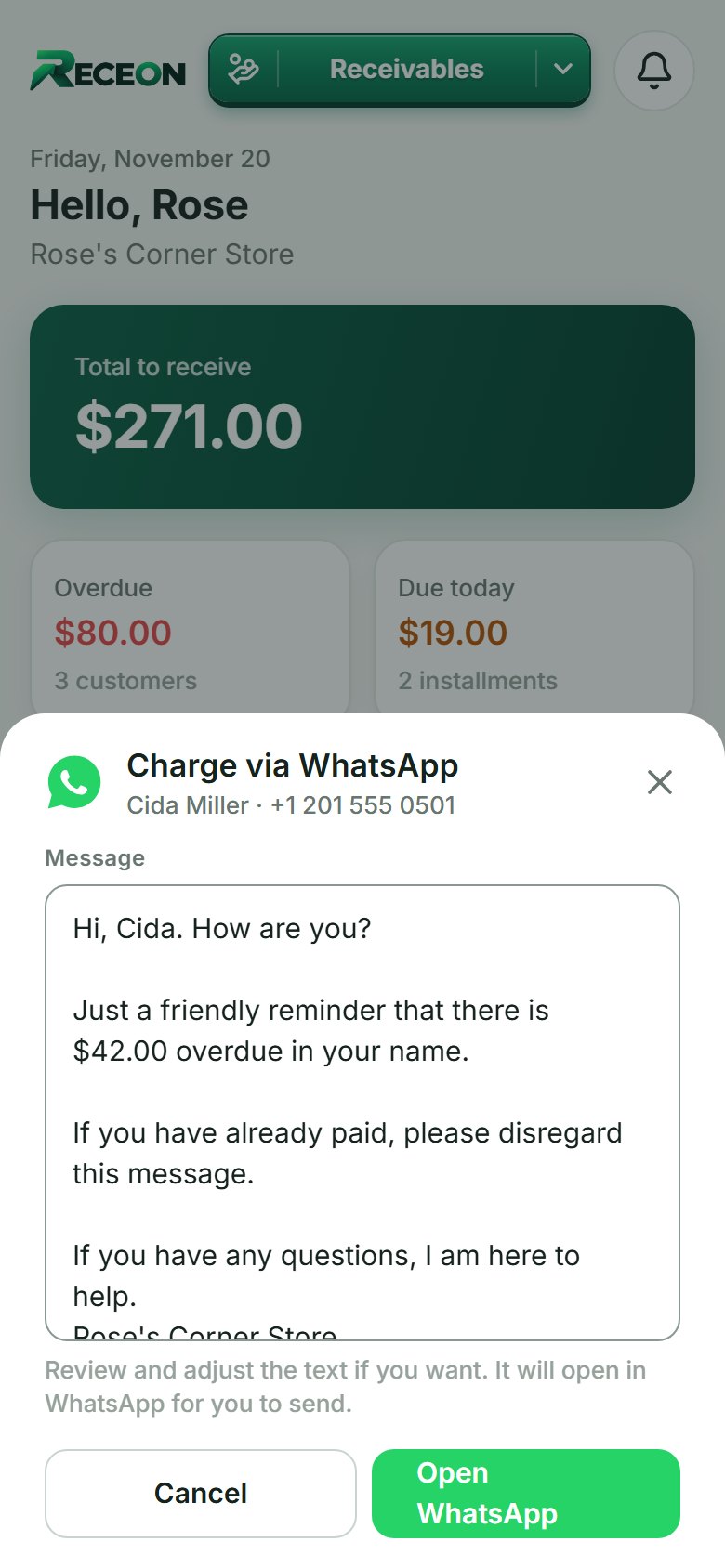
Message ready for WhatsApp: $42.00 overdue under the customer’s name

Payables

And what your business needs to pay.

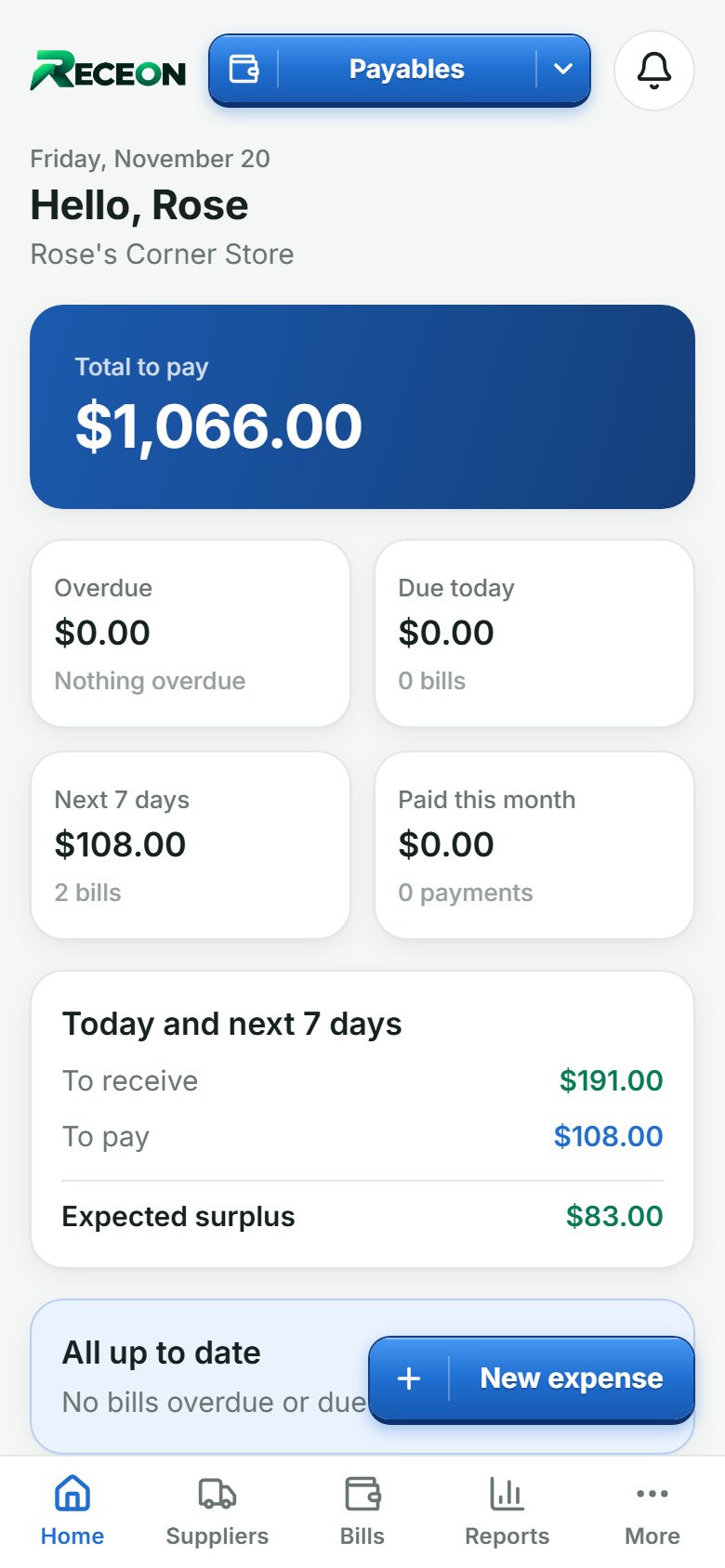
In the same RECEON, switch to Payables and track suppliers and due dates, so the distributor’s invoice isn’t due before the tabs are paid.

  • Distributor, wholesaler and bakery as suppliers
  • Gas, rent and the freezers’ electricity, repeated every month
  • Due date alerts, just like for tabs
  • Tabs coming in and bills going out in the next 7 days
Corner store payables: total to pay and the week's forecast of tabs coming in and bills going out

On the computer and the phone

On the register computer. And on the phone, at the counter.

Open RECEON in the computer browser and in the Android app, with the same information. On iPhone, it works in the browser.

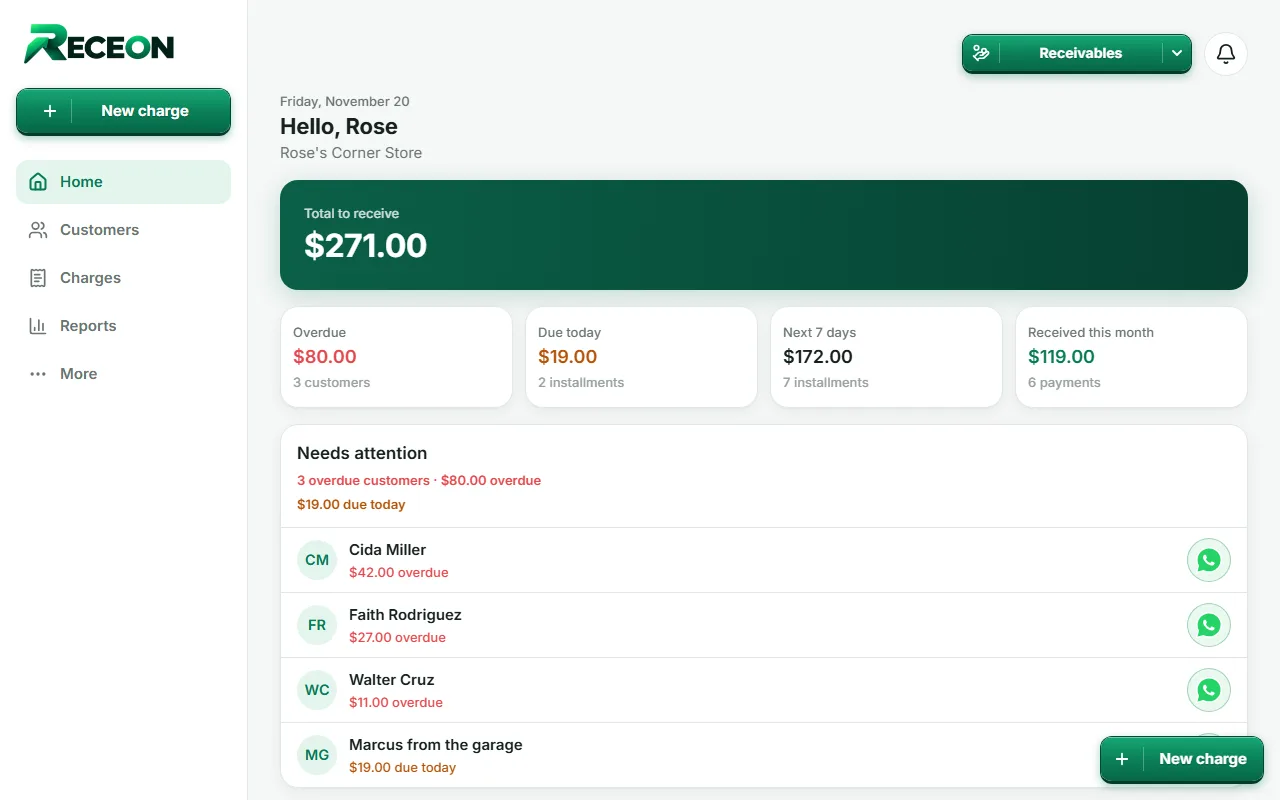
  • Who owes, how much and since when, right on the home screen
  • Search by customer name or by what they bought
  • Reports of what came in this month and who owes the most
  • Export everything to Excel anytime
RECEON on the corner store computer: total to receive, overdue and customers who need attention

What RECEON does not do

So you can decide clearly before creating an account:

  • It isn't a cash register or POS, doesn't issue tax invoices and doesn't track inventory.
  • It doesn't set credit limits for customers.
  • It doesn't check or report anyone to credit bureaus.
  • It doesn't charge cards on its own and doesn't move your money: customers pay as always, by transfer, cash or card.

It does one thing and does it very well: tracks your receivables and payables.

Plans for your business

Start for free to try it. For everyday tabs, Completo removes the limits.

Free

To try it

Free

No credit card.

Receivables

  • Up to 5 customers and 10 purchases noted per month
  • One-time charges
  • WhatsApp reminders and PDF receipts

Payables

  • Up to 5 suppliers and 10 bills per month
  • One-time bills

And more

  • Dashboard, overdue items and due date alerts
  • Export of your data
Start for free

Completo

For everyday use

From US$ 6.99 per month

US$ 9.99 in the US, Canada and Puerto Rico. You see the final price in your currency, taxes included, before paying. Subscribe on your computer or in the Android app. One subscription works on both. Cancel anytime.

Receivables

  • Unlimited customers and purchases noted
  • Store credit in installments
  • Recurring charges

Payables

  • Unlimited suppliers and bills
  • Bills that repeat every month

And more

  • Reports and charts
  • Spreadsheet import
  • Everything in Free
Start for free

A business goes past 10 purchases noted per month fast: use Free to try it and Completo for everyday use. The subscription is monthly, from US$ 6.99, in the Android app (Google Play) or in the browser (Paddle). If you cancel, you go back to Free and your data stays saved.

Questions from businesses that sell on credit

Is there an app to track customer tabs?

Yes. RECEON works like a tab book on your phone and computer: you add the customer, note each purchase with the amount and the payment day, and it adds everything up, shows who is late and reminds you of what’s due.

How do I track tabs on my phone?

Add each customer with name and WhatsApp and, for each purchase, note the amount and the agreed payment day on their page. The home screen shows what’s overdue, what’s due today and in the next 7 days, and how much you have to receive.

Can I note several purchases for the same customer?

Yes. Each purchase stays separate, with date, amount and due date, and the customer page shows the total open and what’s already overdue.

How do I know how much each customer owes?

Open the customer page: it shows the total open, how much is overdue and how much they’ve already paid, with no math needed.

What if the customer pays only part?

You record the payment on the purchase, even if it’s only part. The rest keeps showing under their name until it is paid, and each payment gets its own receipt.

How do I remind customers on WhatsApp without losing them?

RECEON writes a polite message with the overdue amount under the customer’s name. You review it and send it from your WhatsApp, privately, without exposing anyone. You can also remind them before the due date.

I sell on store credit in installments. Does it work?

Yes, on the Completo plan. You enter the total amount and the number of installments, and RECEON tracks each one, showing which are open and which are late.

How do I move my notebook to RECEON?

Add the customers who still owe and note what each one owes, with the agreed payment day. If you already use a spreadsheet, on the Completo plan you can import the file instead of typing it.

Does RECEON check or report customers to credit bureaus?

No. RECEON doesn't check or report anyone. It organizes your tabs, shows who owes and helps you collect politely.

Do I need a registered business?

No. RECEON works for the self-employed and for businesses with a registered company.

Close the notebook. Open RECEON.

It adds up the tabs, shows who owes and remembers what’s due for you. Start organizing your customers and your business’s bills today.

Start for free

Get it on Google Play

Start for free on the Free plan. No credit card.

Discover everything RECEON does

Start for free